Printing businesses in the USA are turning to online stores to meet the growing need for quick services. Automated print processes are becoming a necessity, helping businesses reduce manual work and avoid costly design mistakes.
However, many printers still rely on manual order processing, which slows down production and impacts the overall customer experience.
With the support of trusted technology partners such as PrintDeed, which offers a web-to-print store development service, printers can create powerful automated solutions that streamline processes and drive higher conversion. This blog explores how to build a web-to-print store that converts in 2026.
What Is a Web-to-Print Store?
A web-to-print store is an online facility that allows customers to design and order printed materials by offering a single online facility that allows customers to place orders for products. Companies can use custom web-to-print stores to curate products like banners and other promotional materials.
How the Web-to-Print Process Works
The web-to-print process is easy and efficient. It involves the following steps:
- The customer chooses a product from the online store.
- The customer uploads their own artwork or selects a template.
- The system provides a live preview of the final product.
- Instant price quotes are generated based on the customer’s choices.
- The customer places their order online.
- The order is sent to the print system.
Difference Between eCommerce and Web-to-Print Store

Unlike eCommerce stores, web-to-print stores offer the functionality to customize designs by making them suitable for print businesses seeking to streamline the process in 2026.
Why Print Businesses Need Web-to-Print Platforms in 2026
- Manual Order Processing : Manually handling orders leads to production delays and higher error rates, which restrict the company from expanding its operations.
- Artwork Work Errors : Print business operations suffer from artwork file errors, which create incorrect print files, resulting in expensive reprints, material waste, production delays, and reduced efficiency.
- Slow Customer Approvals : The web-to-print platforms from 2026 achieve faster approval processes through a new system that replaces traditional email proofing, enabling faster production and improved workflow efficiency.
- Lack of Automation : Print businesses need web-to-print automation software to drive operational growth, as it enables them to process orders more efficiently and deliver faster service.
- Growing Demand For Online Ordering : Web-to-print solutions enable today’s print companies to simplify print purchasing by reducing manual processing and increasing efficiency.
Step-by-Step Process to Build a High-Converting Web-to-Print Store
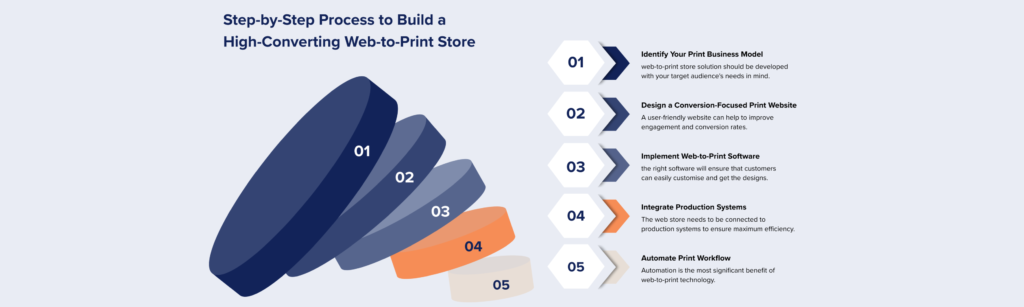
Step 1 : Identify Your Print Business Model
Before setting up a web-to-print store, it is essential to identify your target audience. Your web-to-print store should be developed with your target audience’s needs in mind.
Some of the common business models that can be used in a print business include:
- B2B print buyers who purchase large quantities of print.
- Retail customers look for customized print items.
- Franchise businesses require standardized brand templates.
- Mostly corporate clients require consistent marketing materials.
Step 2 : Design a Conversion-Focused Print Website
A successful online print shop should offer a seamless and simple user experience. A user-friendly website can improve engagement and conversion rates.
Key UX considerations include the following:
- Easy navigation for print products to help customers quickly locate print products
- Customisation tools that are easy to use to help customers personalise designs
- A mobile-friendly design to help customers order print products online using their smartphones.
- A simple checkout process with a few steps helps customers quickly order print products online.
Step 3 : Implement Web-to-Print Software
The heart of any web to print development is its software. Using the right software will ensure that customers can easily customize and get the designs.
The must-have software includes the following:
- Online design editor for real-time customization.
- Artwork upload validation to check for print errors.
- Template management system for branded designs.
Most print shops are now turning to PrintDeed’s custom web-to-print solutions to build flexible platforms that suit their workflows.
Step 4 : Integrate Production Systems
The web store needs to be connected to production systems to ensure maximum efficiency. This will help to ensure that orders are processed efficiently and there are no delays in operations.
- MIS systems for job tracking and cost management.
- Order management tools for workflow organization.
- Shipping platforms for automated delivery updates.
Step 5: Automate Print Workflow
Automation is the most significant benefit of web-to-print technology. Automation helps printers save time by handling repetitive printing tasks.
Automation helps printers in the following ways:
- Reduces manual processing of orders.
- Helps in faster processing of orders.
- Reduces errors in files by automating error checks.
By following these steps and using advanced solutions such as PrintDeed, printers can create a custom web-to-print solution.
Conversion Features Every Web-to-Print Store Needs

In 2026, successful web-to-print software is all about creating ordering systems that feel easy and reliable. The proper conversion tools enable print companies to create a smoother customer buying experience, which results in higher sales and better customer retention.
- Live Design Preview : Helps customers visualize their artwork on their printed items by minimizing errors and increasing customer confidence in their orders.
- Instant Pricing Calculator : Helps customers get accurate information about their orders by minimizing confusion and increasing their confidence.
- Saved Templates for Repeat Orders : Supports businesses saving their templates for items such as business cards or brochures. It helps to save time for similar orders in the future.
- Corporate Ordering Portals : Helps companies manage their orders, spending, and brand assets through their company portal. The online print ordering helps many businesses to take it to the next level.
- One-Click Reordering : Facilitates customers in reordering their previous print orders with just one click, without the need to redesign and reconfigure their specifications, thus promoting customer loyalty.
- Multi-Location Order Management : Facilitates franchises and businesses with multiple locations by providing the capability to manage orders for multiple locations.
Common Mistakes that Print Businesses Must Avoid
- Using Generic eCommerce Platforms : Most print businesses use generic eCommerce sites that lack built-in features to support the print industry. Without product customization, variable data printing, and file management, customers may have a poor experience, thereby affecting the site’s effectiveness.
- Ignoring Print Automation : Most print businesses do not automate their order processing, approval systems, and file management. Without automation, print businesses will not be able to process a high volume of orders, reducing their efficiency.
- Poor Design Tools : Most print automation software has ineffective or complex design tools that make it difficult for customers to customize their products. Without efficient design tools, customers will be unable to customize their products, thereby reducing the site’s effectiveness.
- No System Integrations : Most web-to-print stores lack system integrations, which makes it difficult to automate their business processes. Without system integrations, print businesses will not operate efficiently.
Conclusion
The print industry is quickly shifting toward digital ordering, making web-to-print stores a must for modern print businesses. A conversion-focused website, paired with smooth workflow automation, can significantly improve user experience and drive more orders.
To get it right, working with an experienced development team really matters. Explore PrintDeed’s web-to-print solutions to build a store that’s not just functional, but designed to grow your business.
Frequently Asked Questions
What is a Web-to-print Store?
A web-to-print store is an online platform that allows customers to customize, design, and order printed products directly through a website.
How do I Build a Web-to-print Website?
To build a web-to-print website, businesses typically need a design editor, product customization tools, automated pricing, and integration with print production systems.
What Software is Used for Web-to-Print?
Web-to-print platforms use specialized software that includes design editors, order automation tools, template libraries, and production workflow integrations.
Why Do Print Businesses Need Web-to-Print Software?
Web-to-print software reduces manual work, prevents design errors, speeds up order processing, and enables customers to place print orders online.
How Much Does It Cost to Build a Web-to-Print Store?
Costs vary depending on customization, integrations, and features. Custom platforms usually require development tailored to a print business’s workflow.
Can Small Print Shops Use Web-to-Print?
Yes. Small and mid-size print businesses can use web-to-print solutions to automate orders and compete with larger online print providers.
Get Your Free Web-to-Print Store Audit
Get a quick audit of your current print setup and discover simple changes that can improve conversions and reduce manual work.